
Invitation Homes
Invitation Homes, IncHouse & Home
4.664.00 Reviews
- Version
- 2.11.97
- Installs
- 50.00K
- Age Rating
- Everyone
Screenshots


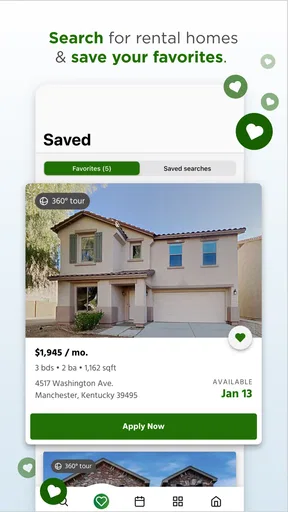
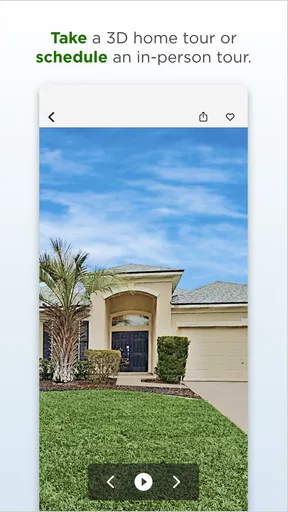
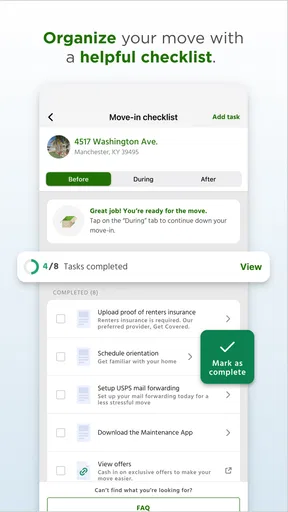
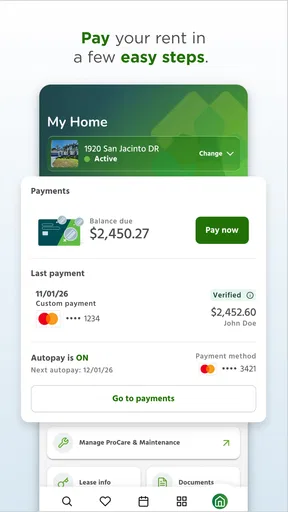
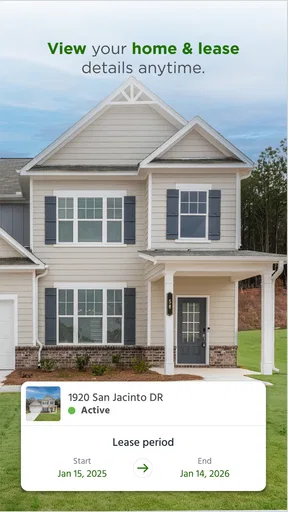
Our Review of Invitation Homes
 Analysis by Appyee
Managing a rental home can become a small daily job: checking a repair request, remembering a payment, finding a document, or trying to understand what happens next after contacting the property team. Invitation Homes is built for that part of renting. I found it most useful as a central place for residents who want a clearer routine around their home rather than relying on scattered messages, browser tabs, and notes.
The app comes from Invitation Homes, Inc and sits in the House & Home category. It is free, aimed at Everyone, and the store summary presents the idea simply: “Rent smart. Get more.” That line is brief, but the practical value is easier to see when you treat the app as a resident companion rather than a general home-management tool. It is specifically relevant to people connected with Invitation Homes, not to someone looking for a universal rent tracker or a marketplace for apartments.
What the app is really for
My first impression is that Invitation Homes makes the most sense when I use it as a starting point for rental-related tasks. Instead of wondering which channel to use, I can open the app and look for the relevant home or account action. That reduces the mental load around ordinary tenancy details, especially when a problem needs to be reported or followed up.
That focus is also the app’s main boundary. It is not a replacement for a general budgeting app, a smart-home controller, or a broad maintenance checklist. If I rent from another company, the app is unlikely to become part of my daily routine. For an Invitation Homes resident, however, having a dedicated mobile entry point is more convenient than treating every request as a separate administrative task.
The app has a 4.6 average from over 900 ratings, which suggests that many users find the overall experience worthwhile. I would not treat that number as a guarantee that every repair or account interaction will feel effortless, because the app is only one part of a larger rental service. Still, it is a useful signal that the mobile experience has earned a generally positive response.
Speed expectations in everyday use
For this kind of app, speed is less about flashy animation and more about how quickly I can reach the action I need. A resident opening the app usually has a practical reason: a maintenance concern, a payment-related task, or a question about the home. The best experience is one that gets out of the way and lets me identify the next step without unnecessary wandering.
In my view, Invitation Homes should be judged as a focused utility, not as an entertainment app. A short pause while a home record or service detail loads is more tolerable here than in a game, but repeated searching would quickly become frustrating. The app’s value depends on reducing uncertainty, so clear organization matters almost as much as raw response time.
A useful habit is to open the app before composing a long message or making a phone call. I can first check whether the issue already has a dedicated route, whether a previous request is visible, and whether the relevant information is already attached to my resident account. That simple check can prevent duplicate reports and gives me a better sense of what I am asking the property team to handle.
The current version is 2.11.97, so users should keep the installed build reasonably current when possible. Updates can matter more for a resident app than people expect: a small compatibility fix can affect sign-in, screen loading, or the way a request is submitted. I would not postpone an important home issue just because the app needs attention, but I would make updating part of normal maintenance for the phone.
What happens during heavier use
The app is unlikely to feel “heavy” in the same way as a video editor or a 3D game. Its demanding moments are more practical: moving between account areas, opening a maintenance workflow, reviewing information, and switching back after checking something elsewhere. That means the phone’s available memory and connection quality can affect the experience even when the app itself is modest.
One realistic scenario is a small leak noticed late in the evening. I might take a photo with the phone camera, return to Invitation Homes, describe the location, and try to submit the issue while also checking whether a similar request is already active. The useful workflow is to gather the essentials first, then enter the app with a concise description. That reduces the chance of losing a draft or having to repeat the same steps while moving between apps.
Another scenario is preparing for a move or a scheduled visit. Rather than searching through old conversations, I can use the resident app as the first place to review the relevant home information and any visible task history. I still would not assume that every detail of a complicated situation belongs only in the app; for anything time-sensitive or unusual, I would keep the confirmation details and use the appropriate contact method as well.
This is where the app’s focused design can help, but it can also expose a limitation. A dedicated rental app may organize the company’s process well while offering less flexibility than a general notes app or email thread. If I need a personal timeline with receipts, photos, dates, and my own reminders, I would keep that separate. The app can be the operational doorway, while my own records provide a backup.
Reliability and recovering from interruptions
Reliability matters more here than visual polish. A resident may open the app because something in the home needs attention, so a failed submission or unclear status can create real anxiety. I look for two things: whether the app makes the next action understandable and whether I can recover without starting the entire process again after an interruption.
My practical advice is to treat important requests as something worth verifying. After submitting an issue, I would check for a visible confirmation or status change and keep a short note of what I reported. If the screen appears frozen, I would avoid tapping the submit control repeatedly. First I would wait, then check whether the request was already recorded before trying again. That approach helps prevent duplicate maintenance reports.
Connectivity is another everyday variable. A basement, a driveway, or a room with weak mobile reception can make any resident service feel unreliable even when the phone is working normally. If a request is urgent, I would move to a stronger connection and prepare the description in a notes app first. This is not glamorous advice, but it is the kind of habit that makes a service app safer to use when the situation is inconvenient.
I also prefer keeping the operating system and the app in a stable state rather than testing it immediately after changing several phone settings. Invitation Homes supports Android devices from Android 7.0 onward, which covers a broad range of phones. Older compatible devices may still feel slower than newer ones, so a user should distinguish between an app problem and a phone that is already struggling with storage, memory, or an aging system.
Recovery is especially important if I am interrupted by a call, a notification, or the camera. Before leaving a form, I would make sure the key details are saved somewhere else, particularly the address context, the problem description, and any useful timing information. That gives me a clean way to continue even if the app returns to a previous screen or the session needs to be reopened.
Device limits and resource demands
Invitation Homes is a sensible fit for a normal smartphone, but “works on Android 7.0” should not be confused with identical performance on every supported device. A newer phone with free storage will usually feel more comfortable than an older handset running many background services. The app’s job does not appear to require gaming-level hardware, yet basic phone health still matters when loading account information or moving through a multi-step request.
I would avoid judging the app while the phone is nearly full. Low storage can affect updates, photo handling, and general stability across the entire device. Before reporting a maintenance issue with images, I would also check that the camera and gallery are functioning normally. If the phone is already slow in other apps, clearing space and restarting it may solve more than reinstalling the resident app.
Battery use is best considered in context. A short visit to a rental-management app should not be treated like a long navigation session, but taking photos, switching applications, and waiting on a weak connection can make the overall task last longer. My approach would be to capture the necessary evidence efficiently, write a precise description, and submit once rather than repeatedly reopening the same workflow.
There is also a privacy-and-convenience trade-off in using a dedicated app. I get a more direct route into the Invitation Homes experience, but I am also choosing to manage rental tasks through a company-specific mobile channel. Someone who prefers keeping all records in a browser or email may feel more comfortable with those alternatives. The app is better for quick access; a browser or personal filing system may be better for long-term organization.
How it compares with ordinary rental alternatives
The usual alternative is a mix of phone calls, email, a web portal, and personal reminders. That approach can work, especially for a resident who rarely needs help, but it makes the process depend on remembering which channel handled which issue. Invitation Homes has an advantage when I want one recognizable place to begin.
Email remains useful when I need a detailed written explanation or want to preserve a long conversation. A browser portal can be preferable on a laptop when I am reviewing several documents or typing a lengthy message. A phone call is still the better choice when an issue is urgent, confusing, or difficult to describe through a form. The app should complement those options rather than pretend to replace every one of them.
Compared with a generic rent-payment app, Invitation Homes is more relevant to the relationship between a resident and this particular housing provider. Compared with a home-maintenance notebook, it offers a more direct connection to the company’s resident process. The trade-off is flexibility: my own notebook can track anything, while the dedicated app is most valuable inside its intended rental context.
One non-obvious benefit is consistency. Even when I already know how to contact the property team, opening the app first can help me use the same route each time. That creates a personal habit: check the resident account, review any existing activity, submit a focused request, and preserve my own record. Consistency is particularly helpful for recurring issues that might otherwise be reported several times in slightly different ways.
Who will benefit most from using it
I would recommend Invitation Homes to residents who prefer handling routine rental tasks from a phone and want a dedicated connection to their housing provider. It is especially suitable for people who are often away from a computer, share household responsibilities, or want a quick first step when something needs attention at home.
It can also help a household decide who is taking care of an issue. One person can check the app for the current state of a request while another keeps personal notes or photographs. That division is more practical than forwarding every message back and forth, although I would still make sure everyone knows which person is responsible for following up.
The app is less compelling for someone who does not rent through Invitation Homes, rarely uses a smartphone, or already has a well-organized browser-and-email routine that feels faster. I would also hesitate to rely on it alone for an emergency or a situation where immediate human guidance is needed. In those cases, the right contact route matters more than the convenience of opening an app.
The age rating is Everyone, which fits its straightforward household purpose. It is not a social network or a game that needs a child-focused explanation, but families should still use sensible judgment about who can access a signed-in device and view rental information. A shared phone can be convenient, yet account security and personal records deserve the same care as any other household service.
Small habits that make the experience better
I found that the most useful improvement comes from preparing before opening the app. For maintenance, I would note the room, the visible symptom, when it started, and whether it is getting worse. If a picture helps, I would take one wide image for context and one closer image for detail. This makes the eventual report more useful than a vague message such as “something is broken.”
I would also check the request history before creating a new report. That is a simple but valuable safeguard: an issue may already be in progress, or a previous report may contain the information I was about to repeat. Reviewing the existing record first can save time and give me a more accurate question if I need to follow up.
For account-related tasks, I would avoid doing them while rushing between appointments. A stable connection, a charged phone, and a few uninterrupted minutes are usually worth more than trying to complete the process in a poor-signal location. If I must stop, I would record what I have already done rather than trusting my memory.
Finally, I would keep the app updated and maintain enough free space for ordinary phone operations. The app is free, and it has passed 50,000 installs, but popularity does not remove the need for basic device housekeeping. A clean, current phone gives the app a fairer chance to perform smoothly and makes troubleshooting easier if something goes wrong.
My performance verdict
Invitation Homes succeeds when I use it for what it is: a focused resident app for people connected with Invitation Homes, Inc. Its strongest quality is not spectacle but convenience. It gives rental-related tasks a recognizable home on the phone, which can make ordinary maintenance and account routines feel less scattered.
I would describe its performance expectations as modest and practical. It does not need powerful hardware to be useful, but an older or crowded phone, weak connection, or interrupted workflow can make any service task feel slower. The best results come from preparing clear information, checking existing activity, submitting carefully, and keeping a personal backup for important details.
The app’s rating and broad installation base make it easy to consider, and its free access removes a financial barrier. Still, I would not install it expecting a universal home-management suite. Its usefulness depends heavily on being an Invitation Homes resident, and urgent or unusually complex situations may still be better handled through direct support.
Overall, I would recommend trying Invitation Homes if your rental relationship is with this provider and you want a mobile-first way to begin everyday home tasks. I would keep email, browser access, phone support, and personal notes available as companions rather than competitors. Used with that realistic expectation, it feels like a sensible tool: not a replacement for the entire rental service, but a convenient and potentially time-saving front door to it.
Verdict
Strengths of Invitation Homes
- Browse available Invitation Homes rentals in one place.
- Save favorite properties for easier comparison later.
- View photos, amenities, and key home details before contacting.
- Search helps narrow listings by location and preferences.
- Useful for renters seeking professionally managed single-family homes.
Limitations of Invitation Homes
- Availability may be limited depending on your preferred area.
- Rental prices and fees can vary significantly between properties.
- Some listings may require additional screening or application steps.
- The app may offer fewer options than broad rental marketplaces.
- Maintenance and support features may depend on your lease status.
Similar Picks in This Category
View All
Universal TV Remote Control
CodeMatics Media Solutions3.9

AlfredCamera Home Security app
Alfred Systems Inc.4.7

Planner 5D: AI Home Design
Planner 5D4.5

Universal Tv Remote-Cast to TV
One Music Player4.1

Zillow: Homes for Sale & Rent
Zillow Group4.8

99acres Buy/Rent/Sell Property
infoedge.com4.3
Frequently Asked Questions
What is Invitation Homes, and what can I do with the app?
Invitation Homes is a rental-property platform designed for residents of Invitation Homes-managed properties. After signing in, tenants can generally review lease and account information, submit and monitor maintenance requests, communicate with the property management team, access useful resident resources, and receive updates related to their home. Available features may vary depending on your lease, location, and account status.
Do I need to be an Invitation Homes resident to use the app?
Most of the app’s resident features are intended for people who rent a home managed by Invitation Homes. You will usually need valid account credentials or an invitation connected to your lease before you can access private information and services. Prospective renters may find property-related information through Invitation Homes’ website, but full resident functionality generally requires an active account.
Can I report maintenance problems through Invitation Homes?
Yes, maintenance support is one of the main reasons residents use the platform. You can typically describe an issue, provide photos or other details, and follow the progress of a submitted request. For urgent situations—such as flooding, fire, a suspected gas leak, or immediate danger—you should follow Invitation Homes’ emergency instructions and contact the appropriate emergency service instead of relying only on an in-app request.
Can I pay rent or manage my lease in the Invitation Homes app?
Depending on your property and account setup, the app may provide access to rent-payment tools, account details, lease information, notices, and other resident services. Payment methods, processing times, fees, and available options can differ by location and lease agreement. Before submitting a payment, carefully review the confirmation screen and retain any receipt or transaction reference for your records.
Is the Invitation Homes app free, and is my personal information protected?
The Invitation Homes app is generally free to download, although normal internet or mobile-data charges may apply. Because it can handle sensitive rental, contact, and payment-related information, use a strong password, keep the app updated, and avoid signing in on shared or unsecured devices. Privacy practices are governed by Invitation Homes’ policies, which you should review before creating or using an account.
